Retriever
The Retriever fetches offloaded logs back on demand. It reads the customer-owned S3 bucket where the Receiver sent the cohort it held back from the analyzer, indexes those events, and returns them when asked, to backfill a metric or replay an old incident.
Your own forwarder ships the events back to an analyzer: the Retriever streams them to an existing Fluentd or Fluent Bit, or writes them to results_location for your own loader.
An AI agent runs it through the log10x MCP: install with advise_retriever, query with retriever_query and retriever_series. The deploy and query guides cover the same steps by hand.
Workflow
The app operates in two phases for efficient data handling: Index builds searchable filters when files upload to storage, and Query retrieves and streams matching events on-demand to log analyzers and dashboards.
Index
The Index phase executes when log files upload to storage (e.g., S3 bucket) to enable in-place querying.
graph LR
A["<div style='font-size: 14px;'>⚡ Trigger</div><div style='font-size: 10px; text-align: center;'>File Upload</div>"] --> B["<div style='font-size: 14px;'>📡 Receive</div><div style='font-size: 10px; text-align: center;'>Read Events</div>"]
B --> C["<div style='font-size: 14px;'>🔄 Transform</div><div style='font-size: 10px; text-align: center;'>Parse & Structure</div>"]
C --> D["<div style='font-size: 14px;'>🎁 Enrich</div><div style='font-size: 10px; text-align: center;'>Add Context</div>"]
D --> E["<div style='font-size: 14px;'>📝 Write</div><div style='font-size: 10px; text-align: center;'>Search Indexes</div>"]
classDef trigger fill:#7c3aed88,stroke:#6d28d9,color:#ffffff,stroke-width:2px,rx:8,ry:8
classDef receive fill:#9333ea88,stroke:#7c3aed,color:#ffffff,stroke-width:2px,rx:8,ry:8
classDef transform fill:#2563eb88,stroke:#1d4ed8,color:#ffffff,stroke-width:2px,rx:8,ry:8
classDef enrich fill:#059669,stroke:#047857,color:#ffffff,stroke-width:2px,rx:8,ry:8
classDef write fill:#ea580c88,stroke:#c2410c,color:#ffffff,stroke-width:2px,rx:8,ry:8
class A trigger
class B receive
class C transform
class D enrich
class E write⚡ Trigger: File upload events to object storage send notifications directly to the Index SQS queue for asynchronous processing by index workers
📡 Receive: Read log events from the uploaded file in object storage (S3)
🔄 Transform: Structured log events into typed objects with typed fields (severity, timestamp, source, message)
🎁 Enrich: Add context via enrichment rules: geo-IP location, severity classification, k8s metadata, lookup tables
📝 Write: Generate lightweight search indexes that map keywords and fields to specific files, enabling queries to skip most files
Architecture
S3 uploads send event notifications to an SQS queue, triggering index workers to generate lightweight search indexes that map keywords and fields to specific files, enabling queries to skip most files.
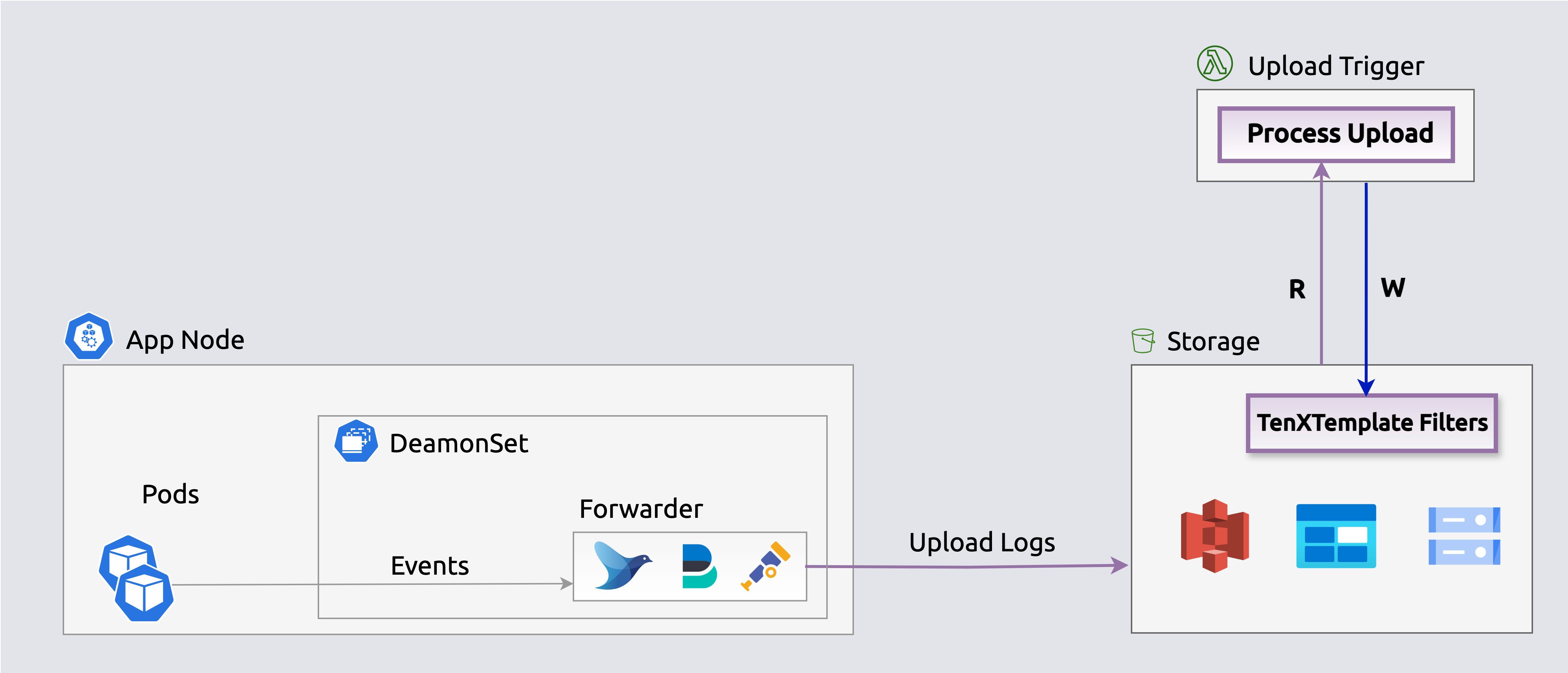
 Search indexes enable querying events in-place
The Receiver in Compact mode losslessly compacts events before they upload, so the stored copy is smaller. Stream queries expand events on the fly for processing and streaming.
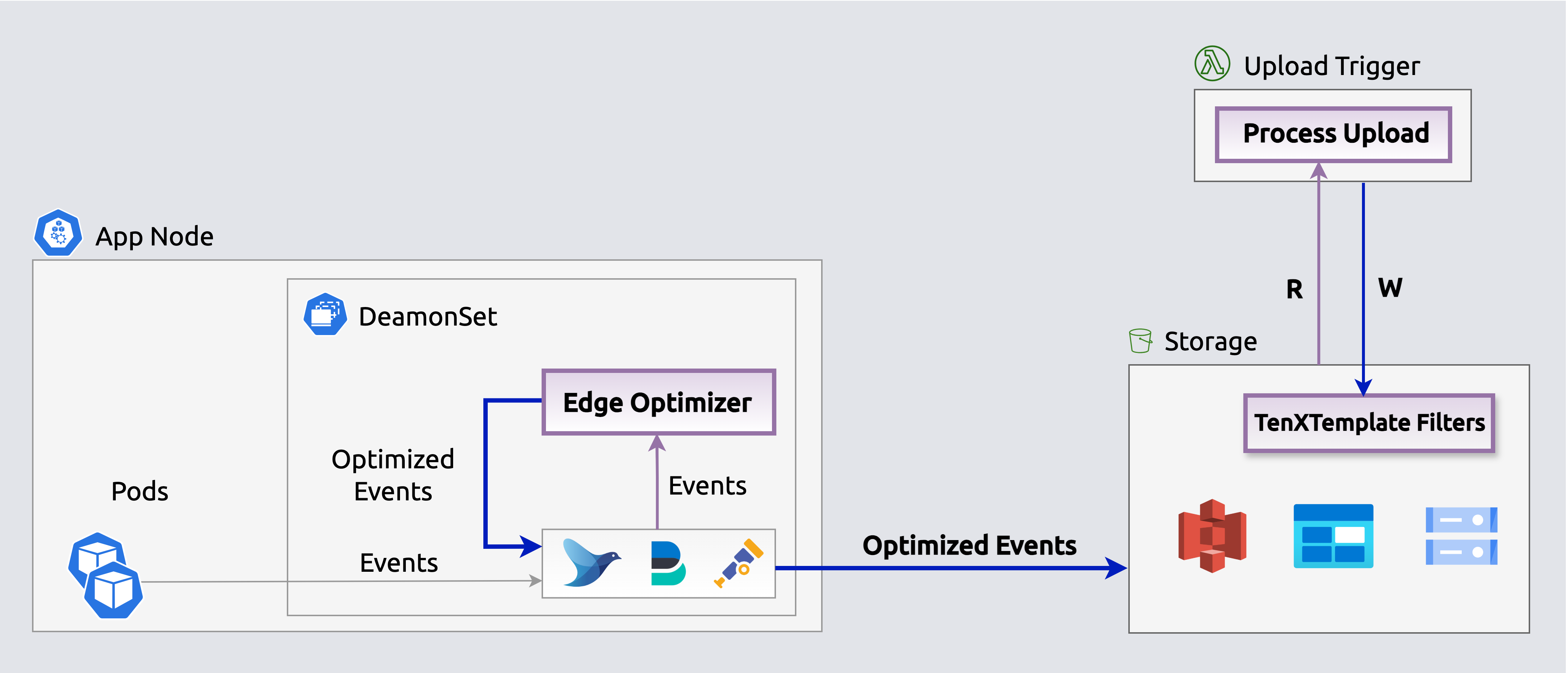 Receiver (Compact mode) losslessly compacts events before they upload.
Query
Execute queries periodically (e.g., k8s CronJob) or on-demand via the Console to populate log analytics dashboards and alerts (e.g., Splunk, Datadog) with selected events.
graph LR
A["<div style='font-size: 14px;'>⏰ Trigger</div><div style='font-size: 10px; text-align: center;'>Cron/API Call</div>"] --> B["<div style='font-size: 14px;'>📥 Query</div><div style='font-size: 10px; text-align: center;'>Filter & Fetch Events</div>"]
B --> C["<div style='font-size: 14px;'>🔄 Transform</div><div style='font-size: 10px; text-align: center;'>Parse & Structure</div>"]
C --> D["<div style='font-size: 14px;'>🎁 Enrich</div><div style='font-size: 10px; text-align: center;'>Add Context</div>"]
D --> E["<div style='font-size: 14px;'>🔍 Filter</div><div style='font-size: 10px; text-align: center;'>filters[] Expressions</div>"]
E --> F["<div style='font-size: 14px;'>📤 Stream</div><div style='font-size: 10px; text-align: center;'>Send to Targets</div>"]
classDef trigger fill:#7c3aed88,stroke:#6d28d9,color:#ffffff,stroke-width:2px,rx:8,ry:8
classDef query fill:#2563eb88,stroke:#1d4ed8,color:#ffffff,stroke-width:2px,rx:8,ry:8
classDef transform fill:#059669,stroke:#047857,color:#ffffff,stroke-width:2px,rx:8,ry:8
classDef enrich fill:#ea580c88,stroke:#c2410c,color:#ffffff,stroke-width:2px,rx:8,ry:8
classDef filter fill:#2563eb88,stroke:#1d4ed8,color:#ffffff,stroke-width:2px,rx:8,ry:8
classDef stream fill:#16a34a88,stroke:#15803d,color:#ffffff,stroke-width:2px,rx:8,ry:8
class A trigger
class B query
class C transform
class D enrich
class E filter
class F stream⏰ Trigger: Queries initiated via scheduled CronJobs or Console calls
📥 Query: Identify and retrieve relevant events from storage by app, timeframe, keywords, or custom criteria
🔄 Transform: Parse fetched events into typed objects with typed fields
🎁 Enrich: Add context via enrichment rules: geo-IP, severity, k8s metadata
🔍 Filter: Optional filters[] JavaScript expressions narrow the result set in-memory after the scan phase, alongside the Bloom search expression and limit/format options. Common filters drop low-severity noise, remove health-check probes, or keep only grouped stack traces.
📤 Stream: Output the selected events to log analyzers (Splunk, Elastic, Datadog) via Fluent Bit, or aggregate into metrics and publish to time-series DBs (Datadog, Prometheus). Horizontal scaling ensures consistent fetch times
Architecture
Enrich, filter with filters[], and stream selected events to log analyzers (e.g., Elastic, Splunk, Datadog) via an embedded Fluent Bit output to populate dashboards, queries, and alerts. The search expression skips most files at scan time, and filters[] expressions narrow the result set in-memory before streaming.
 Stream selected events from storage to log analyzers
Enrich, filter with filters[], aggregate and publish events on-the-fly as metrics to time-series outputs (e.g., Datadog, Prometheus) to populate dashboards, queries and alerts. The search expression and filters[] expressions select which events contribute to metrics before aggregation. Aggregated metrics are published directly to Datadog's metrics API, Prometheus, or other time-series endpoints.
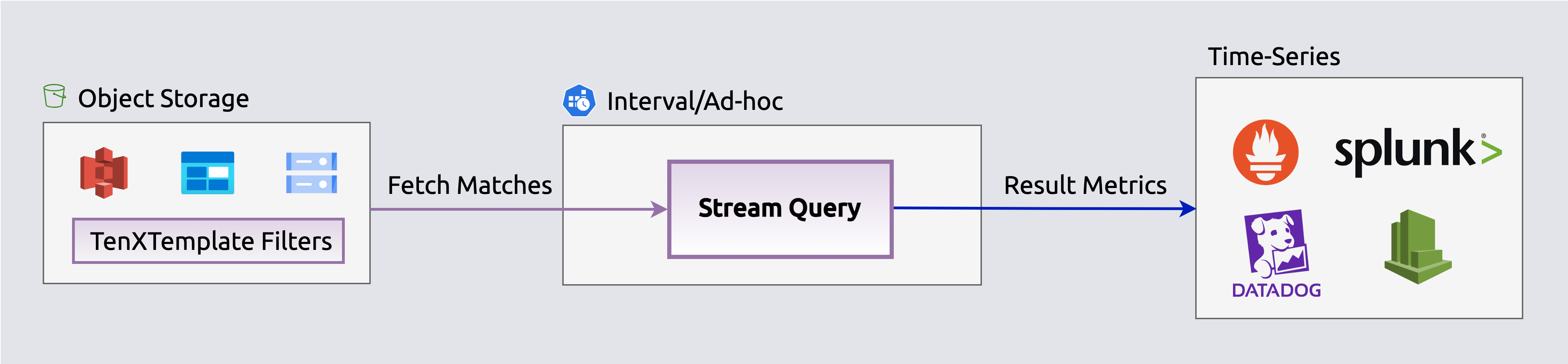 Stream aggregated events as metrics to time-series DBs
Infrastructure & Security
Retriever runs entirely within your own AWS or Azure account. No log data leaves your infrastructure.
| Topic | Detail |
|---|---|
| Runs in your account | Kubernetes or Lambda deployment under your control |
| No automatic data access | You control which events to query and stream |
| Data stays in your bucket | Index and queries operate only on your S3 or Azure Blob files |
| Works on AWS and Azure | S3, Azure Blob Storage, and any S3-compatible object storage |
| Kubernetes Secrets | Credentials never stored in config files |
See the Retriever FAQ for complete details on deployment, data access, and security guarantees.
This app is defined in retriever/app.yaml.