Splunk
Search and visualize compact events in Splunk with zero data loss. This open-source app transparently expands compact events at search time, maintaining full querying, dashboard, and alerting capabilities while reducing ingestion costs by over 50%.
Use the Cloud Reporter to identify optimization opportunities in your existing Splunk data.
Analytics Dashboard
The app includes a built-in analytics dashboard providing real-time visibility into optimization performance, storage savings, and ROI metrics.
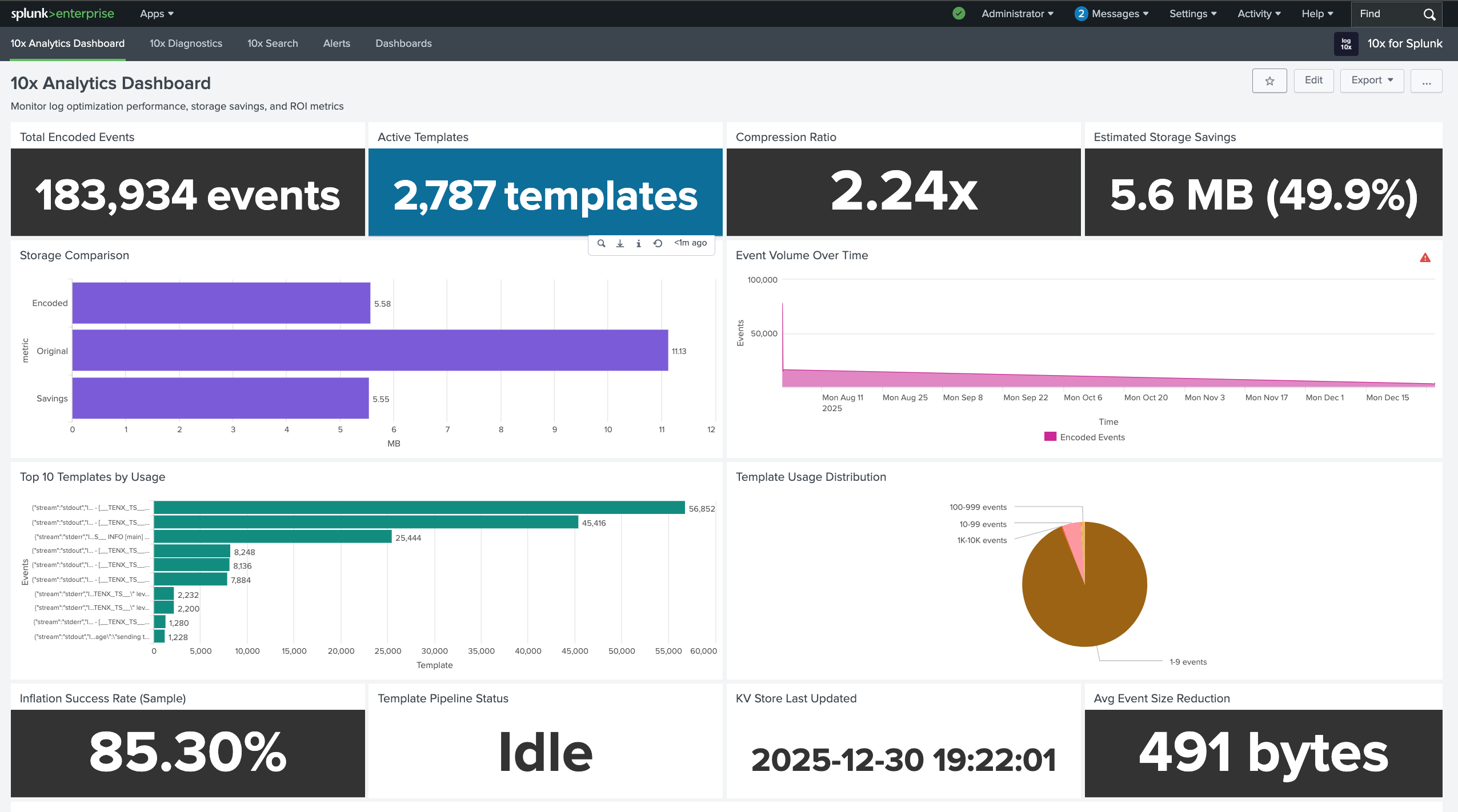
| Metric | Description |
|---|---|
| Total Encoded Events | Count of optimized events ingested |
| Active Templates | Number of unique patterns in KV Store |
| Reduction Ratio | Average reduction factor across all events |
| Storage Savings | Estimated bytes saved and percentage reduction |
| Event Volume Over Time | Trend comparison of encoded vs original volume |
| Top Templates by Usage | Most frequently matched patterns |
| Expansion Success Rate | Percentage of events successfully expanded |
How It Works
The app intercepts search requests and automatically expands compact events before displaying results. Users interact with Splunk exactly as before - searching, building dashboards, and configuring alerts on the original full-fidelity data.
Ingestion Flow
Events are compact at the edge and ingested into Splunk with reduced payload size:
graph LR
    A["<div style='font-size: 14px;'>🗜️ Optimizer</div><div style='font-size: 10px;'>Encode Events</div>"] --> B["<div style='font-size: 14px;'>📡 Ingest</div><div style='font-size: 10px;'>UF / HEC</div>"]
    B --> C["<div style='font-size: 14px;'>📋 KV Store</div><div style='font-size: 10px;'>Templates</div>"]
    B --> D["<div style='font-size: 14px;'>💾 Index</div><div style='font-size: 10px;'>Encoded</div>"]

    classDef edge fill:#7c3aed88,stroke:#6d28d9,color:#ffffff,stroke-width:2px,rx:8,ry:8
    classDef ingest fill:#9333ea88,stroke:#7c3aed,color:#ffffff,stroke-width:2px,rx:8,ry:8
    classDef store fill:#2563eb88,stroke:#1d4ed8,color:#ffffff,stroke-width:2px,rx:8,ry:8

    class A edge
    class B ingest
    class C,D store
🗜️ Optimizer: Edge Optimizer encodes events, extracting repetitive patterns into templates
📡 Ingest: Encoded events forwarded to Splunk via Universal Forwarder or HEC with reduced payload size
📋 KV Store: Templates stored in tenx_dml collection for lookup at search time
💾 Index: Compact events stored with template hash references
Search Flow
Searches are transparently transformed to expand compact events:
graph LR
    E["<div style='font-size: 14px;'>👤 User</div><div style='font-size: 10px;'>Search</div>"] --> F["<div style='font-size: 14px;'>🪝 Hook</div><div style='font-size: 10px;'>Intercept</div>"]
    F --> G["<div style='font-size: 14px;'>🔄 Transform</div><div style='font-size: 10px;'>Add Macro</div>"]
    G --> H["<div style='font-size: 14px;'>📖 Expand</div><div style='font-size: 10px;'>Expand</div>"]
    H --> I["<div style='font-size: 14px;'>📊 Results</div><div style='font-size: 10px;'>Full Data</div>"]

    classDef user fill:#059669,stroke:#047857,color:#ffffff,stroke-width:2px,rx:8,ry:8
    classDef hook fill:#f59e0b,stroke:#d97706,color:#ffffff,stroke-width:2px,rx:8,ry:8
    classDef result fill:#ea580c88,stroke:#c2410c,color:#ffffff,stroke-width:2px,rx:8,ry:8

    class E user
    class F,G hook
    class H,I result
👤 User: Submits search query through Splunk UI or API
🪝 Hook: JavaScript dashboard.js intercepts /search/jobs requests via $.ajaxSetup
🔄 Transform: REST handler transforms SPL to include tenx-inflate macro
📖 Expand: Macro joins compact events with templates from KV Store
📊 Results: Full-fidelity events returned with original field names and values
Quickstart
Get encoded events flowing to Splunk in under 15 minutes.
Step 1: Install Splunk App
Clone the repository and install to your Splunk apps directory:
git clone https://github.com/log-10x/splunk-app.git
cp -r splunk-app/tenx-for-splunk $SPLUNK_HOME/etc/apps/
$SPLUNK_HOME/bin/splunk restart
Prerequisites:
| Requirement | Description |
|---|---|
| Splunk Enterprise | Version 8.0 or later |
| Admin Access | Required for app installation and KV Store setup |
Verify Installation
After restart, confirm the app appears in Splunk:
- Navigate to Apps → Manage Apps
- Search for "10x" - you should see 10x for Splunk
- Click the app name to open the Analytics dashboard
Step 2: Create HEC Tokens
Create two HTTP Event Collector tokens in Splunk - one for templates, one for encoded events.
Navigate to HEC Settings:
- Go to Settings → Data inputs → HTTP Event Collector
- Click Global Settings and ensure HEC is Enabled
- Note the HTTP Port Number (default: 8088)
Create Templates Token:
| Setting | Value |
|---|---|
| Name | tenx-templates |
| Source type | tenx_dml_raw_json |
| Index | tenx_dml |
| Enable indexer acknowledgement | Off |
Create Encoded Events Token:
| Setting | Value |
|---|---|
| Name | tenx-encoded |
| Source type | Select appropriate for your logs |
| Index | Your target index |
| Enable indexer acknowledgement | Off |
Create Index First
If tenx_dml index doesn't exist, create it via Settings → Indexes → New Index before creating the token.
Step 3: Configure Forwarder
Configure your log forwarder to send encoded events and templates to Splunk.
Include 10x optimizer configuration:
# Include 10x optimizer and socket configurations
@INCLUDE ${TENX_MODULES}/pipelines/run/modules/input/forwarder/fluentbit/conf/tenx-optimize.conf
@INCLUDE ${TENX_MODULES}/pipelines/run/modules/input/forwarder/fluentbit/conf/tenx-unix.conf
Configure Splunk outputs:
# ========================= TEMPLATES OUTPUT =========================
# Routes templates to tenx_dml index for KV store population
[OUTPUT]
    Name              splunk
    Match             tenx-template
    Host              your-splunk-host.com
    Port              8088
    Splunk_Token      YOUR_TEMPLATES_HEC_TOKEN
    event_index       tenx_dml
    event_source      fluent-bit-tenx
    event_sourcetype  tenx_dml_raw_json
    TLS               On
    TLS.Verify        Off

# ========================= ENCODED EVENTS OUTPUT ====================
# Routes encoded log events to your target index
# CRITICAL: Use 'event_key $log' to prevent JSON wrapping
[OUTPUT]
    Name              splunk
    Match_Regex       ^(?!tenx-template).*
    Host              your-splunk-host.com
    Port              8088
    Splunk_Token      YOUR_ENCODED_EVENTS_HEC_TOKEN
    event_index       your_logs_index
    event_sourcetype  your_sourcetype
    event_key         $log
    TLS               On
    TLS.Verify        Off
Critical: event_key $log
Without event_key $log, Fluent Bit wraps events in JSON: {"log":"~hash,var1,var2..."}. The Splunk app cannot expand this format. Always use event_key $log for encoded events output.
Prerequisites:
Install the Splunk HEC output plugin:
Include 10x optimizer configuration:
# Include the 10x optimizer exec_filter configuration
# This launches tenx as a subprocess and handles event encoding
@include "#{ENV['TENX_MODULES']}/pipelines/run/modules/input/forwarder/fluentd/conf/tenx-optimize-unix.conf"
Configure Splunk outputs:
# ========================= TEMPLATES OUTPUT =========================
# Routes templates to tenx_dml index for KV store population
<match tenx-template>
  @type splunk_hec
  host your-splunk-host.com
  port 8088
  token YOUR_TEMPLATES_HEC_TOKEN
  index tenx_dml
  sourcetype tenx_dml_raw_json
  use_ssl true
  ssl_verify false
</match>

# ========================= ENCODED EVENTS OUTPUT ====================
# Routes encoded log events to your target index
# IMPORTANT: Use 'format single_value' with 'message_key log' to send
# only the encoded log content, not the full JSON record
<match **>
  @type splunk_hec
  host your-splunk-host.com
  port 8088
  token YOUR_ENCODED_EVENTS_HEC_TOKEN
  index your_logs_index
  sourcetype your_sourcetype
  use_ssl true
  ssl_verify false
  <format>
    @type single_value
    message_key log
  </format>
</match>
Critical: format single_value
Without the <format> block, Fluentd wraps events in JSON: {"log":"~hash,var1,var2...","tag":"..."}. The Splunk app cannot expand this format. Use format single_value with message_key log to send only the encoded log content.
Configure exporters in your OTel config:
exporters:
  # Templates exporter
  splunk_hec/templates:
    endpoint: "https://your-splunk-host.com:8088/services/collector"
    token: "YOUR_TEMPLATES_HEC_TOKEN"
    index: "tenx_dml"
    sourcetype: "tenx_dml_raw_json"
    tls:
      insecure_skip_verify: true

  # Encoded events exporter
  splunk_hec/encoded:
    endpoint: "https://your-splunk-host.com:8088/services/collector"
    token: "YOUR_ENCODED_EVENTS_HEC_TOKEN"
    index: "your_logs_index"
    sourcetype: "your_sourcetype"
    tls:
      insecure_skip_verify: true

service:
  pipelines:
    logs/templates:
      receivers: [tenx_templates]
      exporters: [splunk_hec/templates]
    logs/encoded:
      receivers: [tenx_encoded]
      exporters: [splunk_hec/encoded]
Step 4: Verify End-to-End
Run these SPL queries to confirm everything is working:
1. Check templates are arriving:
Expected: JSON events withtemplateHash and template fields
2. Check KV store is populated:
Expected: Count > 0 (may take up to 2 minutes for first templates)3. Check compact events expand:
Expected: Full expanded events, not~hash,var1,var2... format
First Templates Take Time
The "Consume KV" saved search runs every 2 minutes. If KV store is empty, wait 2-3 minutes and check again.
Step 5: Enable Expansion in Search & Reporting (Optional)
The verification queries in Step 4 run from within the 10x for Splunk app, where the search hook is already active. If you also want to search encoded events from Splunk's default Search & Reporting app, copy the search hook:
cp $SPLUNK_HOME/etc/apps/tenx-for-splunk/appserver/static/dashboard.js \
   $SPLUNK_HOME/etc/apps/search/appserver/static/
After copying, bump Splunk's static file cache or restart:
Now searches in the default Search app will also expand events automatically.
Only needed if you use the default Search app
If you only use the 10x for Splunk dashboards or custom apps where you've already added the hook, you can skip this step.
Verification Checklist
Use this checklist to diagnose issues at each stage of the pipeline.
Templates Arriving in Splunk?
Test Query:
| Result | Meaning | Action |
|---|---|---|
| Count > 0 | Templates arriving | Proceed to KV store check |
| Count = 0 | No templates received | Check forwarder config, HEC token, network connectivity |
Check raw event format:
Expected format:
KV Store Populated?
Test Query:
| Result | Meaning | Action |
|---|---|---|
| Count > 0 | KV store populated | Proceed to expansion check |
| Count = 0 | Templates not processed | Check "Consume KV" saved search |
Verify saved search configuration:
- Go to Settings → Searches, reports, and alerts
- Find "Consume KV" in the 10x for Splunk app
- Verify search string includes:
index=tenx_dml sourcetype=tenx_dml_raw_json - Click Run to manually trigger
Events Expanding Correctly?
Test Query:
| Result | Meaning | Action |
|---|---|---|
| Full expanded events | Working correctly | Done! |
~hash,var1,var2... format |
Events not expanding | Check hash exists in KV store |
{"log":"~hash,..."} |
JSON wrapping | Add event_key $log to forwarder |
Check if template hash exists:
Troubleshooting
Templates Not Populating KV Store
Symptom: | inputlookup tenx-dml-lookup returns 0 rows even though templates exist in tenx_dml index.
Common Causes:
| Cause | Solution |
|---|---|
Missing index= in saved search |
Edit "Consume KV" search to include index=tenx_dml |
| Time window too narrow | Increase dispatch.earliest_time from -3m to -1h or -1d |
| Special characters in hash | Upgrade Splunk app - URL encoding fix required |
| Saved search disabled | Enable in Settings → Searches → "Consume KV" |
Fix saved search manually:
Edit $SPLUNK_HOME/etc/apps/tenx-for-splunk/local/savedsearches.conf:
Restart Splunk or run the search manually to apply.
Events Show Raw Encoded Format
Symptom: Events display as ~#ABC123,value1,value2,value3 instead of expanded JSON/text.
Common Causes:
| Cause | Solution |
|---|---|
| Template hash not in KV store | Wait 2 min for "Consume KV" to run, or trigger manually |
| Hash mismatch (different data) | Verify encoded events match templates in tenx_dml |
| Search hook not active | Ensure dashboard.js is loaded for your app/view |
Debug hash lookup:
Events Wrapped in JSON
Symptom: Events arrive as {"log":"~hash,var1,var2..."} instead of raw encoded format.
Cause: Missing event_key $log in Splunk output configuration.
Solution: Add event_key $log to your encoded events OUTPUT section:
[OUTPUT]
    Name              splunk
    Match_Regex       ^(?!tenx-template).*
    Host              your-splunk-host.com
    Port              8088
    Splunk_Token      YOUR_TOKEN
    event_index       your_index
    event_key         $log
    TLS               On
This tells Fluent Bit to send only the log field content, not wrap it in JSON.
Cause: Missing <format> block in Splunk HEC output configuration.
Solution: Add format single_value with message_key log to your encoded events match:
<match **>
  @type splunk_hec
  host your-splunk-host.com
  port 8088
  token YOUR_TOKEN
  index your_index
  sourcetype your_sourcetype
  <format>
    @type single_value
    message_key log
  </format>
</match>
This tells Fluentd to send only the log field content, not the full JSON record.
HEC Connection Refused or Timeout
Symptom: Forwarder logs show connection errors to Splunk HEC.
Diagnostic Steps:
-
Test HEC endpoint:
Expected:{"text":"HEC is healthy","code":17} -
Test with token:
Expected:curl -k https://your-splunk:8088/services/collector \ -H "Authorization: Splunk YOUR_TOKEN" \ -d '{"event":"test"}'{"text":"Success","code":0}
| Error | Cause | Solution |
|---|---|---|
| Connection refused | HEC disabled | Enable in Settings → Data inputs → HTTP Event Collector → Global Settings |
| 401 Unauthorized | Invalid token | Verify token value, check token is enabled |
| 403 Forbidden | Token restrictions | Check token's allowed indexes and sourcetypes |
| SSL error | Certificate issues | Set TLS.Verify Off (dev) or configure proper certs (prod) |
Enabling Expansion in Other Splunk Apps
The 10x for Splunk app expands events automatically within its own views. To enable expansion in other Splunk apps, copy the search hook to each app that needs it.
For the default Search & Reporting app, see Step 5 in the Quickstart.
For custom or third-party apps:
cp $SPLUNK_HOME/etc/apps/tenx-for-splunk/appserver/static/dashboard.js \
   $SPLUNK_HOME/etc/apps/YOUR_APP/appserver/static/
Restart Splunk after copying to apply.
Programmatic Hook for Custom Views
For custom dashboards, you can include the hook in JavaScript:
Components
| Component | Description |
|---|---|
| Search Hook | JavaScript module intercepting all search requests |
| Search Handler | REST endpoint transforming SPL queries |
| KV Store | Template patterns for event expansion |
| Inflate Macro | SPL macro joining events with templates |
| Consume KV Search | Scheduled search populating KV store from templates |
| Analytics Dashboard | Encoding metrics and ROI visualization |
| Diagnostics Dashboard | Troubleshooting and verification tools |
This app is open source. View on GitHub.