Query
Queries select events from object storage by target app, time range, and search expression. The query endpoint launches stream sub-apps (via run/input/objectStorage/query) which process matching events and stream them to the Fluent Bit sidecar output configured in apps/cloud/streamer/stream/config.yaml.
Query Console
The Query Console runs locally inside your cluster — no log data or query metadata leaves your infrastructure. The console communicates directly with the streamer pods over the cluster network (SQS or REST), and query results stream to your SIEM via the Fluent Bit sidecar. See security architecture for details on the zero-egress design.
The console provides a web GUI and CLI for submitting queries, with built-in sample queries and progress tracking via CloudWatch Logs.
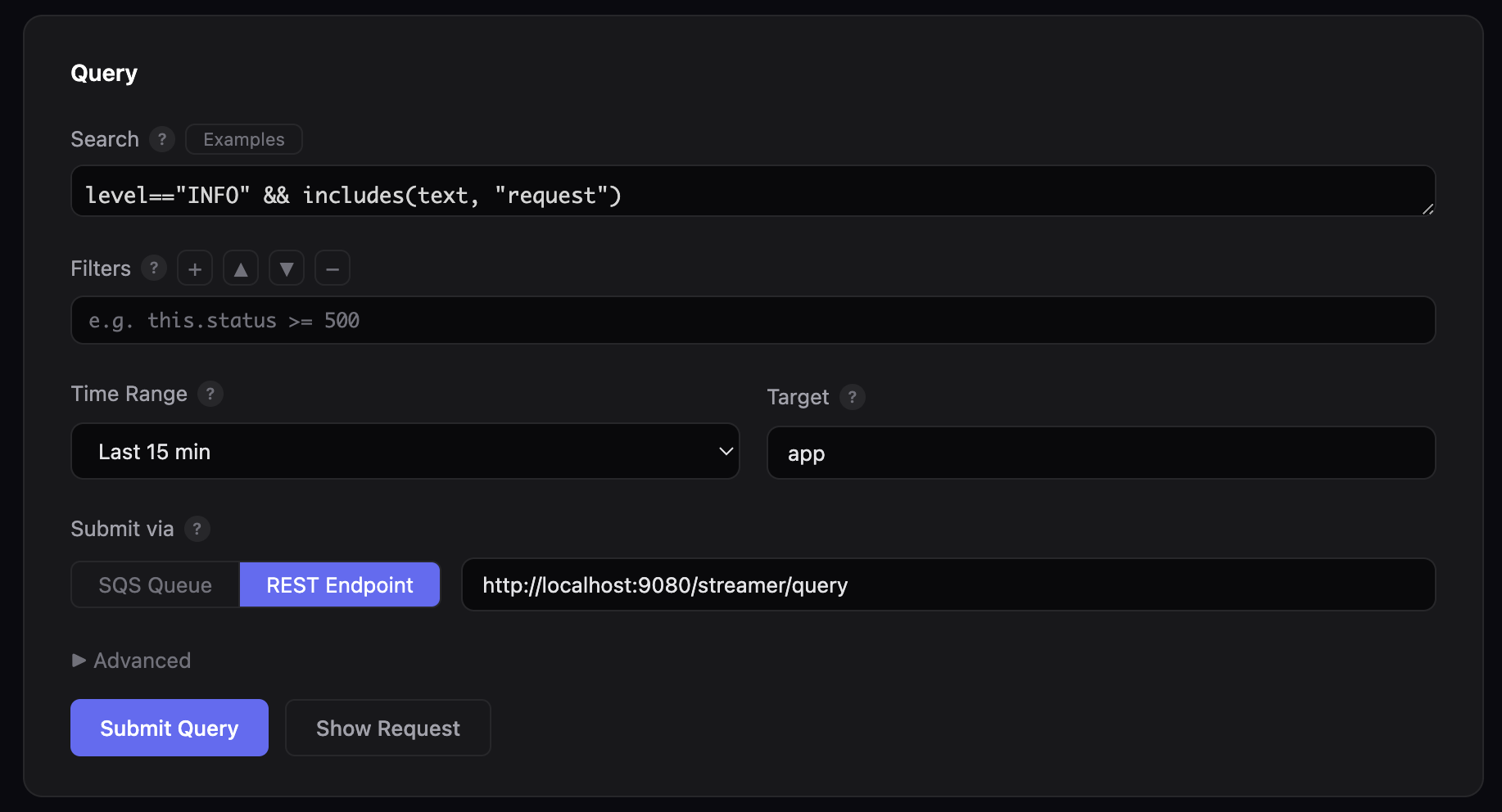
Web GUI
Start the web console to author and submit queries from a browser:
The GUI runs at http://localhost:8080 by default. Use --port to change the port:
Features:
- Search expression editor with example queries
- Filters for in-memory JavaScript filtering after fetch
- Time range selector with preset durations
- Target field to scope queries to a specific app prefix
- Submit via SQS or REST — toggle between SQS queue submission and direct REST endpoint (
/streamer/query) - Dry run — preview the JSON payload without submitting
- Advanced options — processing time, result size limits, log levels, storage buckets
CLI
Submit queries directly from the terminal:
# Search for errors in the last 30 minutes
python3 console.py \
  --search 'severity_level=="ERROR"' --since 30m \
  --bucket my-bucket --queue-url $LOG10X_QUERY_QUEUE_URL --follow
# Dry run — print the JSON payload without sending
python3 console.py \
  --search 'http_code=="500"' --since 1h \
  --bucket my-bucket --dry-run
| Option | Description |
|---|---|
--search EXPR |
Search expression (==, &&, ||, includes()) |
--since TIME |
Relative time range (30s, 5m, 1h, 2d) |
--from / --to |
Absolute time range in epoch milliseconds |
--bucket BUCKET |
S3 bucket containing log files |
--index-bucket BUCKET |
S3 bucket containing index objects (defaults to --bucket) |
--queue-url URL |
SQS queue URL (or set LOG10X_QUERY_QUEUE_URL env var) |
--target PREFIX |
App/service prefix (default: app) |
--processing-time DUR |
Max processing time (default: 60s) |
--result-size SIZE |
Max result volume (default: 10MB) |
--log-levels LEVELS |
Comma-separated log levels (default: ERROR,INFO,PERF) |
--filters EXPR |
JavaScript filter expressions for in-memory filtering |
--dry-run |
Print JSON payload without sending |
--follow |
Poll CloudWatch Logs until query completes |
--region REGION |
AWS region (default: us-east-1) |
Requirements
- Python 3.6+ (no external dependencies for the web GUI)
- boto3 — required only for SQS submission and CloudWatch Logs polling. Install with
pip3 install boto3 - AWS credentials — configured via
aws configureorAWS_ACCESS_KEY_ID/AWS_SECRET_ACCESS_KEYenvironment variables
The console is at $TENX_MODULES/apps/cloud/streamer/console in your local config, or on GitHub at streamer/console.
REST API
Submit queries directly via HTTP POST to the streamer endpoint:
curl -X POST http://localhost:8080/streamer/query \
  -H "Content-Type: application/json" \
  -d '{
    "from": "now(\"-5m\")",
    "to": "now()",
    "search": "severity_level == \"ERROR\""
  }'
The query endpoint returns HTTP 200 to acknowledge receipt. Matched events are processed by stream sub-apps (launched by the query module) and streamed to the Fluent Bit sidecar via the forward output configured in apps/cloud/streamer/stream/config.yaml. Check the Fluent Bit container logs for output:
For the full query configuration reference, see Object Storage Query.
Sample Queries
Query for ERROR events in the last 5 minutes
Query events by severity_level enriched from log level fields:
Query for ERROR or FATAL events containing POST
Combine severity_level with text search using includes():
Query with a fixed time range
Use epoch milliseconds for precise time ranges (multiply seconds by 1000):
Query with extended processing time
Use processingTime for large time ranges or high-volume data:
Query with result size limit
Use resultSize to cap the volume of returned data:
Query by country
Query events by country enriched from IP addresses via GeoIP lookup:
Query by HTTP status
Query events by http_code enriched via lookup tables:
Query by k8s namespace
Query events by k8s_namespace enriched from Kubernetes context:
Query Parameters
| Parameter | Type | Description |
|---|---|---|
from |
Epoch ms | Start of the time range (inclusive). Use now("-5m") for relative time or a literal epoch like 1769076000000. |
to |
Epoch ms | End of the time range (exclusive). Use now() for current time. |
search |
String | Search expression using enriched field names (e.g., severity_level, http_code, k8s_namespace). Must use enriched fields, NOT raw JSON fields like stream, log, or docker. See Sample Queries for working examples. Supports &&, ||, ==, and includes(). |
filters |
List | Optional JavaScript expressions for in-memory filtering after events are fetched from storage. |
processingTime |
Duration | Optional max processing time (e.g., parseDuration("5m")). Defaults to 1 minute. |
resultSize |
Bytes | Optional max result volume (e.g., parseBytes("10MB")). |